Features & Screenshots
Everything PolygonLogix does — and what it looks like doing it. From CAD import and AI purchase order parsing to true-shape nesting, quoting, and machine-ready output.
From Purchase Order to Machine Code
No more bouncing between three different programs to price and cut a single job. PolygonLogix handles the entire workflow.
Software That Thinks Like a Fabricator
Logix Nesting, Now Part by Part
Most nesting engines place one part at a time and never move it again. Logix puts every part on the sheet at once and squeezes the sheet until nothing overlaps, so an early placement can’t lock in a bad layout. In 1.6.4 every part can set its own rotation and mirror, identical parts share one cut at your machine’s real kerf, and a small quote is charged for the strip of sheet it actually fills. The engine comes with Lite, Standard, and Pro; common-line cutting is in the desktop program.
CAD File Import
DXF, DWG, IGES, STEP, and SVG files with full geometry extraction. STEP sheet-metal unfolding and STEP assembly separation into individual parts, right in Draw. Arc geometry preserved for G02/G03 output.
Logix Nesting Engine
True-shape nesting that keeps every part free to move until the sheet is tight, tucks parts into each other’s cutouts, and holds the spacing you set. Rotation and mirror set per part, and common-line cutting at your machine’s real kerf. The Turbo Engine is still there for a fast first look. More on Logix
AI Purchase Order Parsing
Drop in a purchase order, even a scan. Our own model, trained on real fab-shop orders, reads part numbers, quantities, materials, grades, and thicknesses and matches them to your drawings: 96% of lines right on orders it never trained on, 89% on customers it had never seen. How we built it
Your Machine Data
Import your actual tech tables from CSV — real feed rates, pierce times, and kerf widths from your machines, not guesswork.
Instant Quoting
Material, cutting time, consumables, setup, labor, profit margins — calculated instantly with complete cost breakdowns and professional report export.
Machine Post-ProcessorsPRO
Posts for Trumpf (LST), Bodor (G-code), Jet Edge and OMAX, with drafts for Amada, Bystronic and Flow. Posts are editable scripts you import and test, so a new machine doesn’t wait for a new version of the program.
Embedded CAD Editor
Clean up geometry, manage layers, close contours, and edit parts without leaving the program. Unfold STEP sheet metal and split STEP assemblies into parts. AutoCAD-style command line with full snap engine.
Inventory TrackingPRO
Stock sheets, remnants, and heat certs. Nest straight onto the plates on your rack; sheets are used up when the program is exported, and each remnant is recorded, one per physical plate.
Production TrackingPRO
Orders on cards with status, due date, and progress. Load several orders, nest them together, then generate cut paths, export, and print from the same screen.
Logix Path Cut PathsPRO
The cut order, every lead, and every tab, planned the way a careful operator would. The head never crosses a part that’s already cut, tip-ups get balanced tabs, and leads land where they can be cleaned up.
Welding & Powder Coating Pricing
Enter your rates once. Welding is priced by weld minutes or by weld length, fillet size, and process; powder coating by coated area, build-up, or weight. Override any price with a note saying why.
Part Library & Filler Parts
Every part your shop has quoted or made, shared by every seat and ready to quote again. Mark stock parts as fillers and Production drops them into the space a nest leaves (Pro).
Pre-Burn Pass
A film-removal or rust-burn pass before the cut, set per machine and material, shown on the canvas, and priced on the quote. The pass itself runs from Production (Pro), and nothing exports until the machine’s codes are confirmed.
Tag & Layout PrintingPRO
Tags, drop tags, and layouts print on your own label and office printers from one print station, as each job is exported. A printer that’s off keeps its job queued until it’s back.
Shipping, Certs & InvoicesPRO
Photos of cut parts, packing slips for partial or complete shipments, cert packages with the mill certs for every sheet the parts came from, and invoice export to CSV.
Cards marked PRO need PolygonLogix Pro. See everything new in 1.6.4 →
See the Full Quoting-to-Production Pipeline
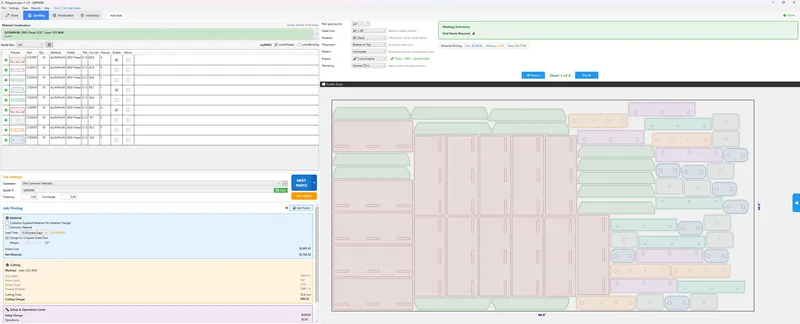
Quoting & Nesting
Parts nested with live cost breakdown, material utilization, and machine settings.
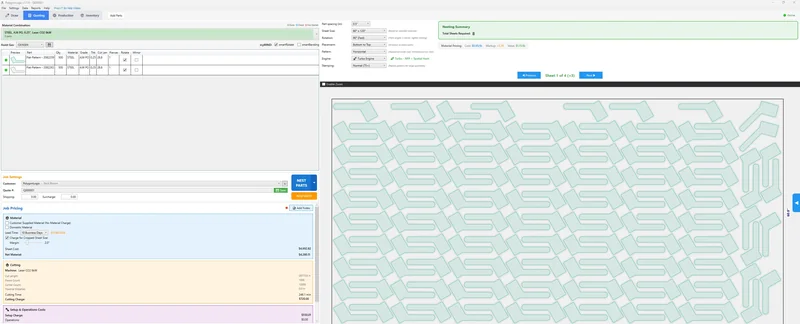
Dense Nesting
500 parts across 8 sheets. True-shape collision detection with pattern stamping.
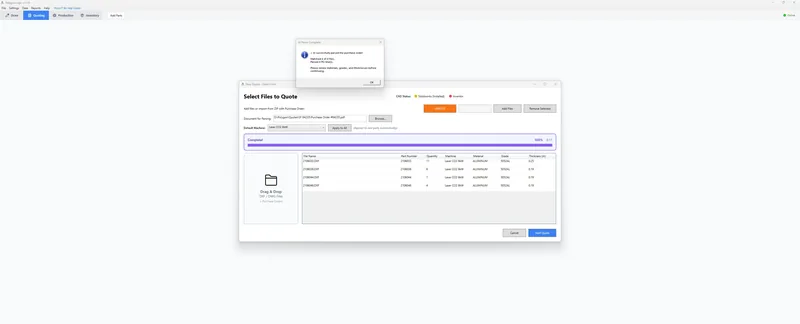
AI Purchase Order Parsing
Drop a PO PDF. Parts, quantities, materials, and thicknesses matched automatically.
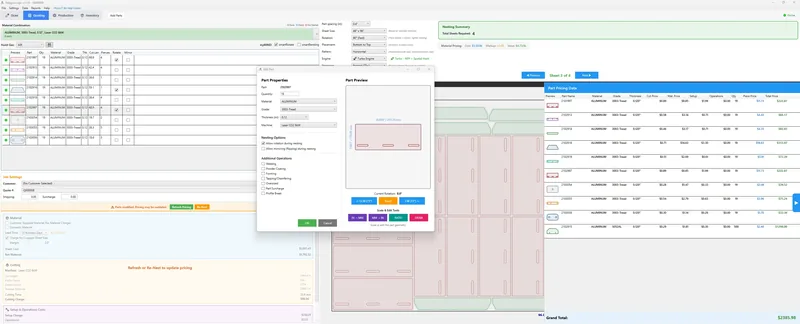
Part Properties & Pricing
Edit part details, preview geometry, and see per-part cost breakdown side by side.
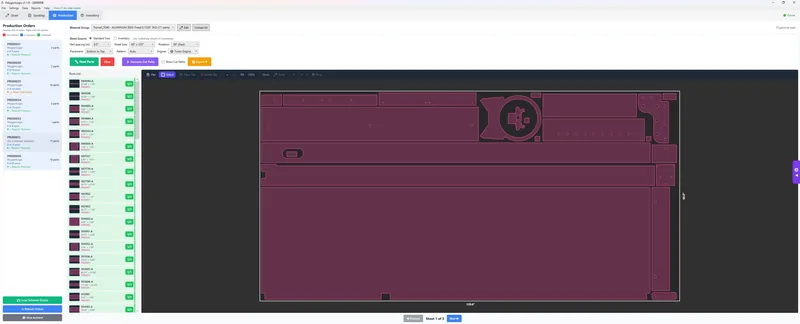
Production & Cut Paths
Production orders with nested parts and generated cut paths. Leads, tabs, and traverse visible.
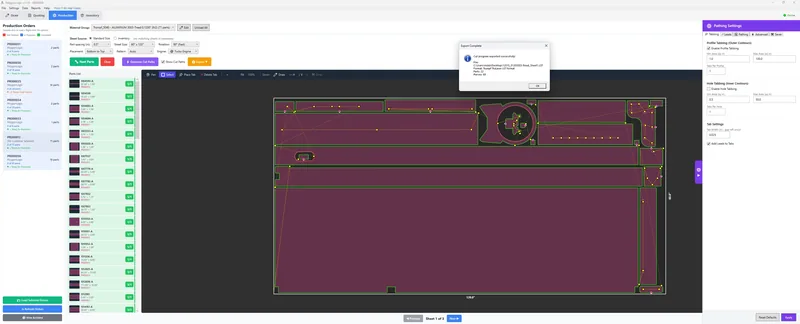
Pathing & Export
Configure leads, tabs, and pathing settings. Export machine-ready code in your format.
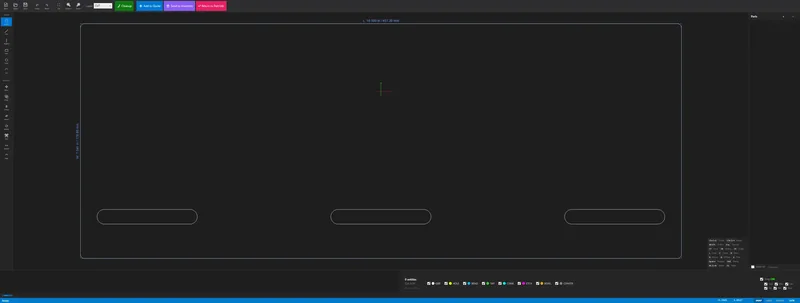
Embedded CAD Editor
Clean up geometry, manage layers, close contours — without leaving the program.
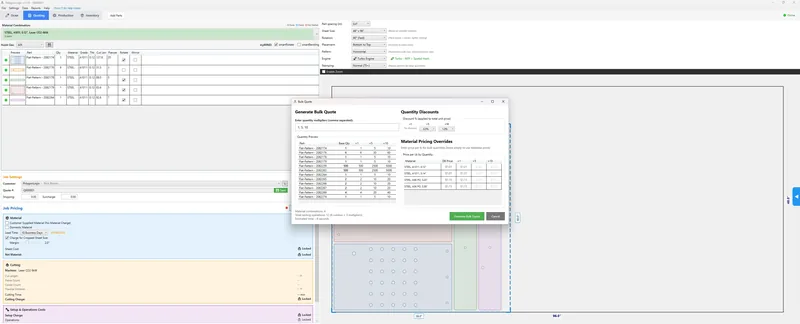
Bulk Quoting
Quantity price breaks with custom multipliers. Actual nests run for each quantity level.
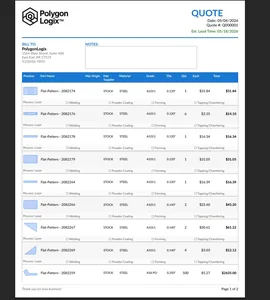
Quote Report
Professional reports with part previews, per-piece pricing, and material details. Ready to send.
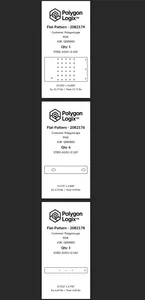
Print Tags
Flat pattern tags with part number, material, weight, and dimensions. Ready for the shop floor.
Drop a PO. Get a Quote.
Stop typing part numbers, quantities, and thicknesses by hand. Drop in a purchase order and let the AI parser do the data entry — read by a model we trained on real fabrication paperwork, running on our own servers, and matched against your 908+ material database automatically. How we built it →
Drop the PO
Import a purchase order: a PDF, a scan, a spreadsheet. Any customer layout. The model reads the page the way a person does, table and all, not just the text.
AI Extracts Everything
Part numbers, quantities, materials, grades, and thicknesses — pulled automatically, 96% of lines right on orders it never trained on. Gauge-to-decimal conversion handled. Lines worth a second look are flagged.
Parts Ready to Nest
Linked to your CAD files, organized by material and thickness, ready for nesting and quoting. A 100-part order populated in under a minute.
Want To See It On Your Parts?
Book a live demo and we’ll run your own DXFs through the nesting and quoting engine while you watch. Demo shops get a trial license and direct input on features.
Request a DemoOnly need to nest and quote? PolygonLogix Lite is the bare-bones browser version: the same nesting engine and tech-table quoting, none of the CAD, cut-path, or production tools, for $65 a month. Start a 7-day free trial, no card needed, or see what's in it.